Finish your reconciliation — with every difference explained.
Drop in two lists that should agree: a supplier statement and your ledger, payouts and your bank, a stock count and your system. TraceGaps matches them, finds what is missing, listed twice or different — and tells you why.
Works with Excel, CSV and PDF statements from QuickBooks, Xero, Sage, your bank and any other system. Free for files up to 500 lines.
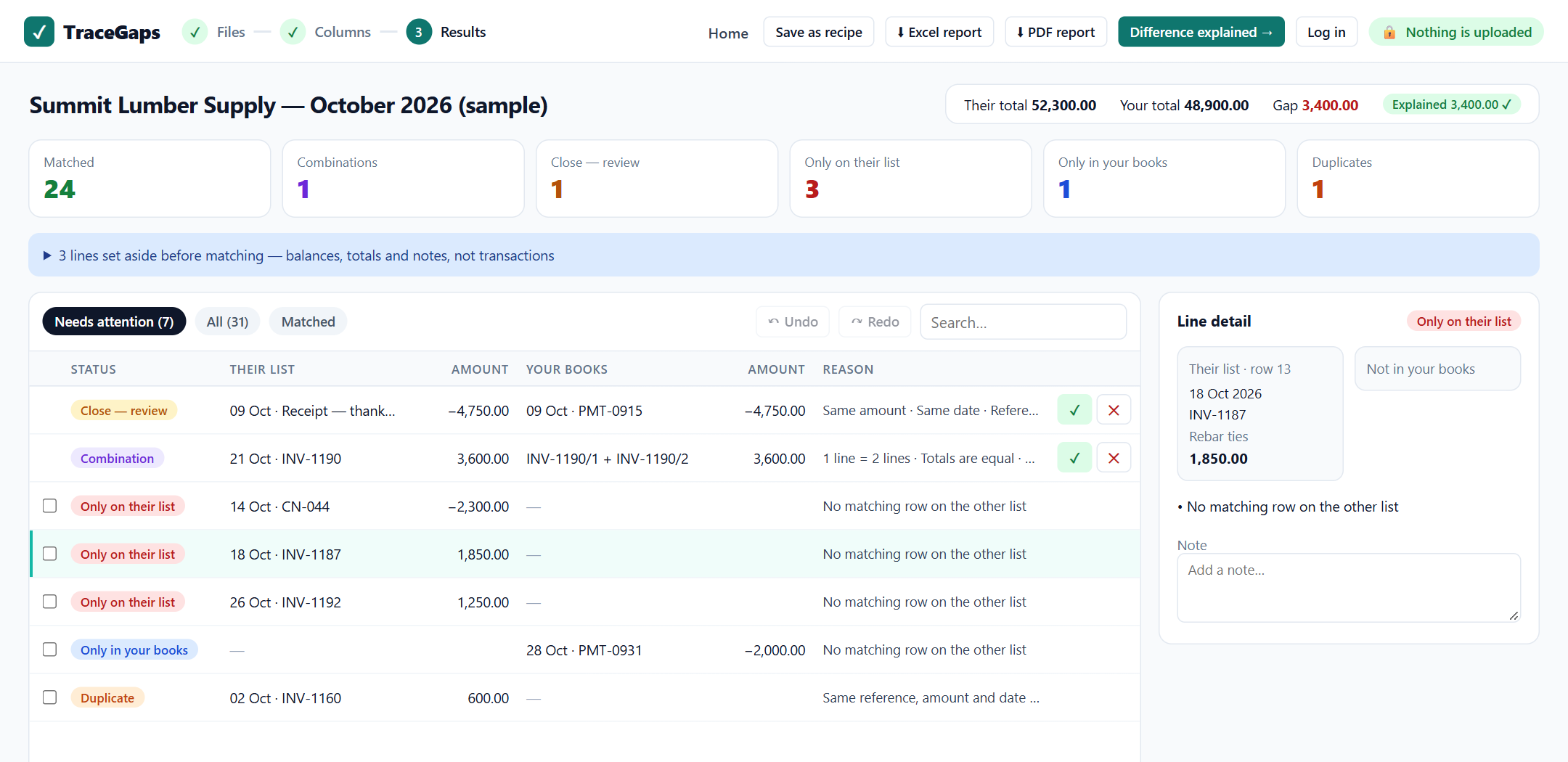
- Only on their listINV-11871,850.00
- 1 line = 2 linesINV-11903,600.00One payment of theirs covers two lines in your books
- Listed twiceINV-1160600.00
- Only in your booksPMT-0931−2,000.00
How it works
Three steps, on your own computer. No setup, no connection to your accounting system.
Drop in two files
Excel, CSV or a PDF statement — from QuickBooks, Xero, your bank or any other system. TraceGaps finds the dates, references and amounts, and cleans up their formats for you.
Every line matched or flagged
Exact matches, close matches, and one payment that covers several invoices — each with the reason it was matched. Anything unsure waits for you to check.
The gap, explained
A breakdown that adds up exactly to the difference between the two totals, a report for your files, and a ready message asking for what is missing.
See every difference, sorted
Instead of a long list of "different", every line gets a clear status and a reason in your own words.
- MatchedSame line on both lists, even when references and dates are written differently.
- CombinationOne line on one side equals several on the other — like one payment for three invoices.
- Close — reviewAlmost the same: a small amount difference, or a reference typed differently. You decide.
- Only on their listMissing from your books — ask for a copy.
- Only in your booksNot on their list yet — often just timing.
- DuplicateThe same line listed twice.
Know exactly why the totals differ
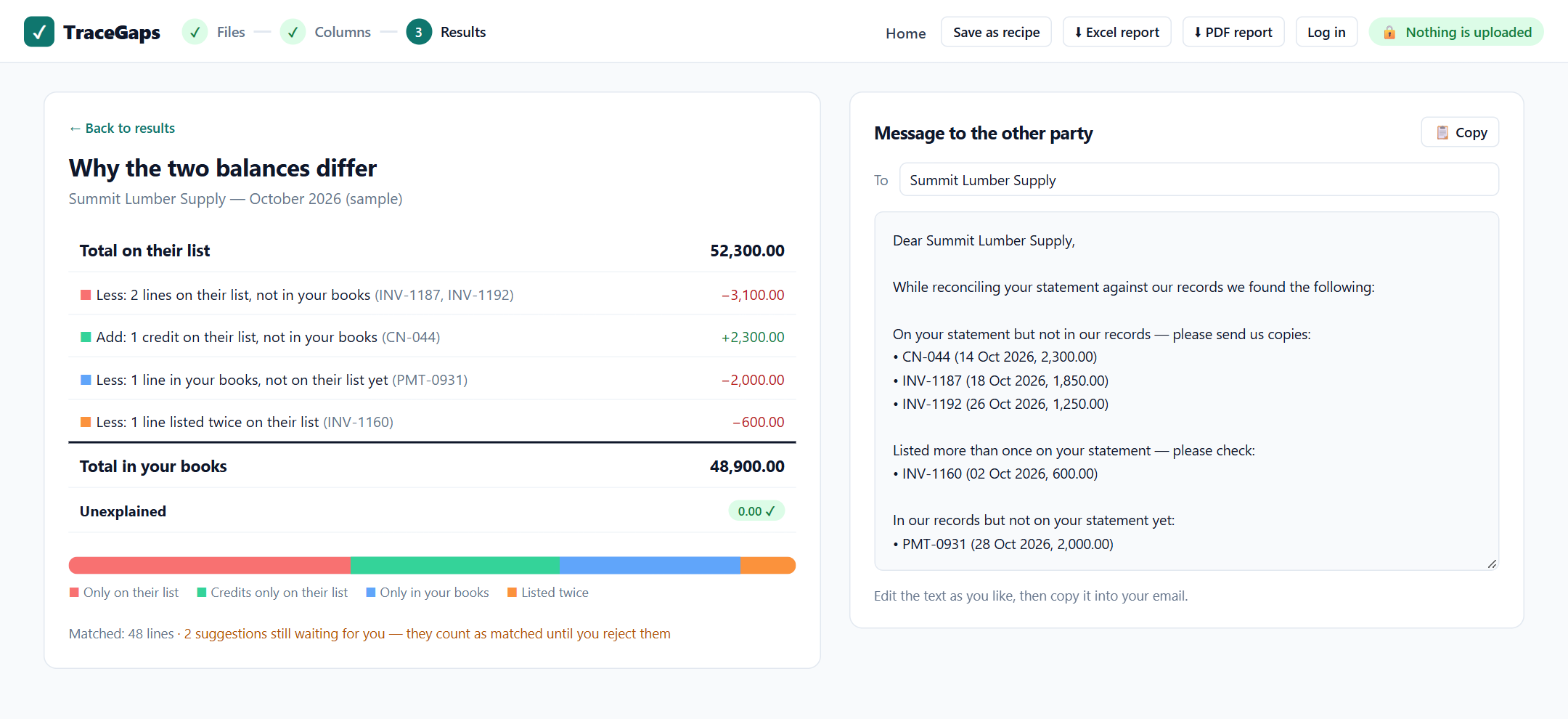
"They say we owe 52,300, our books say 48,900 — why?" TraceGaps answers line by line.
- A breakdown from their total to yours that always adds up — anything left over is shown as unexplained, never hidden.
- A message to the other party listing what to send or check, ready to copy into your email.
- An Excel report with real formulas anyone can check, and a PDF summary for your files.
- Save your settings as a recipe and run next month's files with one click.
Your files never leave your computer
TraceGaps reads and matches your files inside your browser, on your own computer. They are never uploaded — to us or to anyone else. There is simply nowhere on our servers to send them.
Your account only holds your email address, your plan and your saved settings — never a line of your files.
Read our Privacy PolicyCheck it yourself
- Open TraceGaps and press F12 to open your browser's developer tools.
- Choose the Network tab.
- Drop in your files and run the matching.
- Watch the list. If you are signed in you will see small checks of your sign-in and plan — but nothing that contains your files.
Works with the files you already have
Export a report or a list as Excel or CSV — or use the PDF statement your supplier emailed you — and drop it in. No connection to your accounts, nothing to install. TraceGaps finds the dates, references and amounts in any layout, and you can always correct its choice.
What people reconcile with TraceGaps
Any two lists that should agree.
Try it on a sample — or your own files
No sign-up needed. Free for files up to 500 lines.